
How to optimize a blog post
There are several SEO rules you need to follow to optimize a blog post for search engines. In this article, we’ve covered the best practices to help search engines better understand what is your post about to increase chances of ranking high in SERP.
Choose your keywords
One article should focus on only one keyword that contains at least two words. Three-word keywords and long-tail keywords contained of 4+ words are an excellent choice.
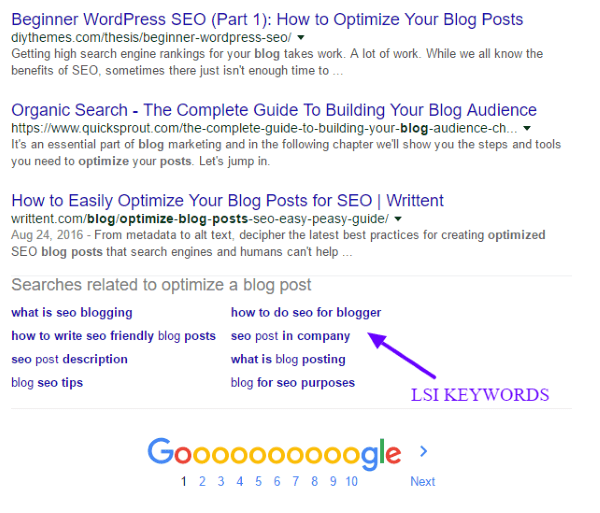
Do a quick keyword research. Choose the main keyword to build your content on and LSI keywords (Latent Semantic Indexing) to include in your text copy. You can find a list of LSI keywords by entering the main keyword in a search engine and scrolling down to the bottom of SERP results.
Check on your competitors
Before writing the article, you should always check your competitors first. Enter your keyword in a search engine and take a look at first 10 results in SERP. If the results you get are coming from high authority domains with long, in-depth and well-optimized articles, it means your competition is very strong, and it might be better to choose a different focus keyword/phrase.
After you choose a less competitive keyword with decent search volume, read competitors’ articles and make sure to write a better one; with unique content and quality information.
Distribute keywords throughout the post
Once you’ve chosen the right keyword you have to distribute it in strategic places:
- wrap the keyword in your title/H1 tag (if your title isn’t an H1 tag, ask your developer to change it to H1) – keep the title between 50 and 60 characters long because search engines will cut off longer titles
- use the keyword in the URL
- start your article with the keyword or at list use the keyword in the first sentence
- insert the keyword in some of the subheadings – H2 and H3 tags
- use the keyword several times in the text copy, but do not overuse it (it’s best to keep the keyword density under 2%)
- sprinkle a few LSI keyword in the article
Keyword based post tags
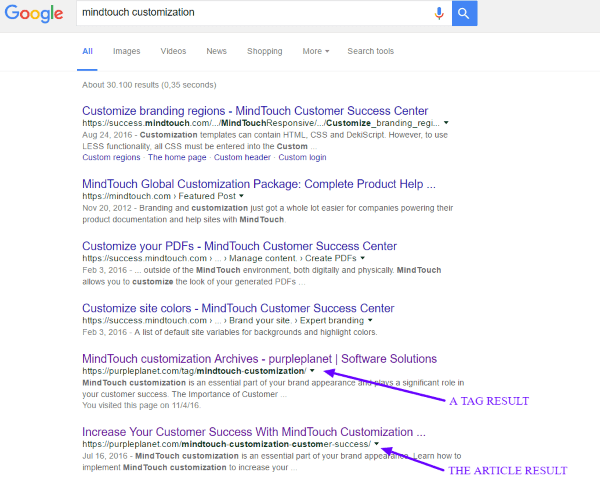
In WordPress, you have the option to add tags to each of your posts. Our recommendation is to add 1-3 keyword-based tags to your post. Use the exact focus keyword and some variations of the keyword.
Tags will not help your post directly to rank better in SERP but will add additional URLs that may be displayed in SERP. Instead of one result for the focus keyword, you might get 2 or more results and increase chances of someone clicking the post.
Optimize your images
Since search engines cannot read them, you have to optimize images for the focus keyword:
- choose a keyword-based descriptive file name – divide words using hyphens instead of underscores
- scale the image dimensions and compress the file to reduce its size – large image files can increase the page load speed which is one of the ranking factors
- wrap your keyword in the alt tag
- match the image description with the surrounding content
Write a custom meta description
Meta description is a part of the preview snippet which search engines display in SERP. It is the text shown right under the snippet title and URL.
Based on the quality of the title tag, URL, and most of all, meta description, searchers decide whether or not to click your result. Take your time to write an appealing reader-friendly meta description. Include your keyword in the beginning and finish with a call-to-action.
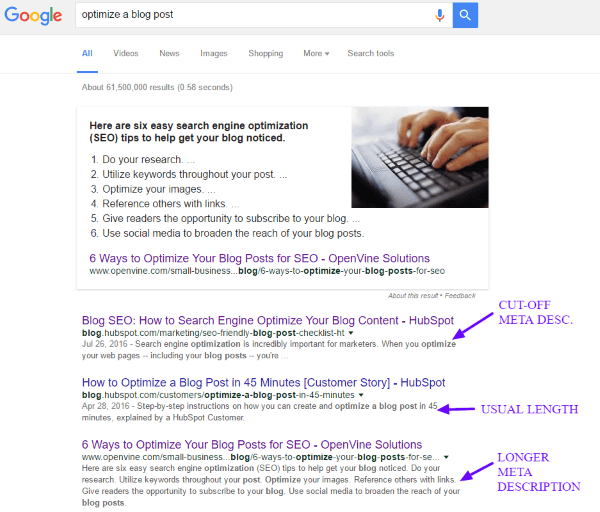
Bear in mind the meta description usual length is between 145 and 165 characters. Sometimes, Google might display more, even up to 372 characters but the best practice still is to keep meta descriptions shorter or, if you want to write longer descriptions, put the most important message in the beginning. Otherwise, search engines might cut it off.
Use internal and external links
Link internally whenever you can. Optimize a blog post by using a descriptive keyword-based anchor link that will point to other relevant pages on your website.
Use external links once or twice, to high authority, relevant pages, only when it adds value to the reader.
Optimize a blog post by improving its readability
To make sure your post is easy and pleasant to read, use these guidelines:
- break the wall of text with headings and subheadings, use numbered/ bulleted lists, quotes
- keep sentences short and clear, under 20 words whenever possible
- use transition words when possible, especially in long sentences
- avoid passive voice
- style important parts of sentences in bold and/or italic
These simple rules are all you need to optimize a blog post for search engines. After optimization, do your best to distribute the post to your social media channels and relevant websites that are willing to share your content.